<?xml version="1.0" encoding="utf-8"?>
<feed xmlns="http://www.w3.org/2005/Atom">
            <title type="text">米啥博客</title>
            <subtitle type="text">生活&兴趣&梦想</subtitle>
    <updated>2026-03-06T21:55:44+08:00</updated>
        <id>https://freshines.com</id>
        <link rel="alternate" type="text/html" href="https://freshines.com" />
        <link rel="self" type="application/atom+xml" href="https://freshines.com/atom.xml" />
    <rights>Copyright © 2026, 米啥博客</rights>
    <generator uri="https://halo.run/" version="1.4.0">Halo</generator>
            <entry>
                <title><![CDATA[微信聊天纪录EnMicroMsg.db软件查看]]></title>
                <link rel="alternate" type="text/html" href="https://freshines.com/archives/wechat-enmicromsg-db-view" />
                <id>tag:https://freshines.com,2022-01-17:wechat-enmicromsg-db-view</id>
                <published>2022-01-17T23:40:43+08:00</published>
                <updated>2022-01-17T23:55:55+08:00</updated>
                <author>
                    <name>freshines</name>
                    <uri>https://freshines.com</uri>
                </author>
                <content type="html">
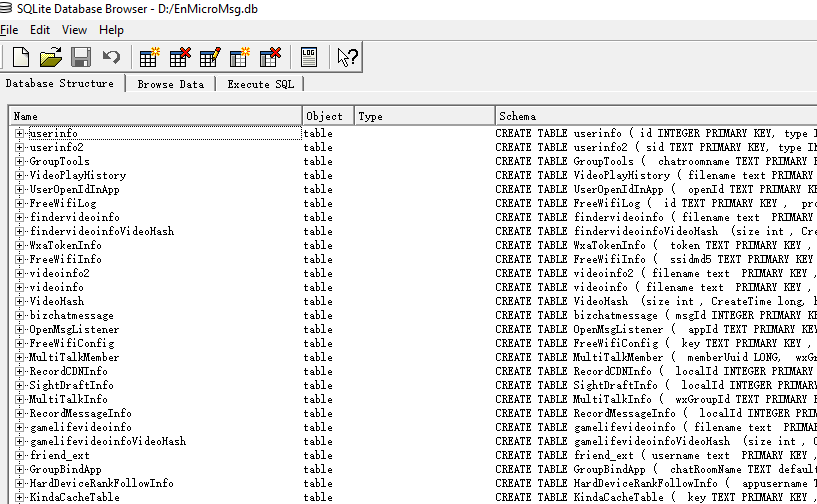
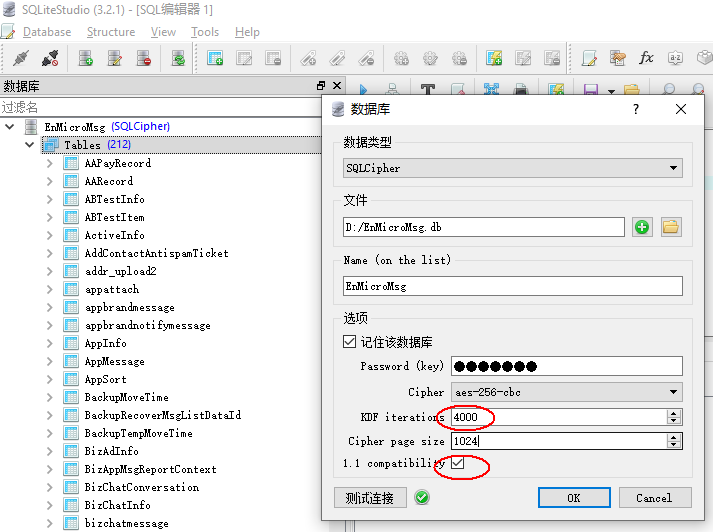
                        <![CDATA[<h1 id="前提">前提</h1><p>本文假设已经按照以下计算方法计算出密码：<br /><img src="/upload/2022/01/wechat-msg-pwd-59f798f910464d3d984e5da4515e123e.png" alt="" /><br />密码 = MD5(IMEI+uin)的前7位，所有结果字母均为小写。IMEI及uin怎么获取可自行百度Google，网上介绍的比较多，故本文只介绍怎么避免一些容易踩的坑。</p><h1 id="概要">概要</h1><p>windows下使用SQLite相关软件打开EnMicroMsg.db查看数据，坑儿比较多。使用的软件或者版本不对都将打不开。估计是微信为了保证兼容性，SQLcipher的版本一直没升级，因此如果使用较新的SQLcipher查看软件将提示密码错误。这里介绍几个验证通过的软件及版本，以便节约各位时间</p><h1 id="软件验证">软件验证</h1><h2 id="1--sqlcipherexe-21无需编译">1.  SQLcipher.exe 2.1(无需编译)</h2><blockquote><p>验证结果：成功<br />下载：<a href="https://pan.baidu.com/s/1Orh7gsYST1FaxJRAmgr0Ng" target="_blank"><a href="https://pan.baidu.com/s/1Orh7gsYST1FaxJRAmgr0Ng">https://pan.baidu.com/s/1Orh7gsYST1FaxJRAmgr0Ng</a></a><br />提取码: rh94<br /><img src="https://freshines.com/upload/2022/01/wechat-SQLcipher-2.1-062a923502c740c38a82dbd5a47ff2ad.png" alt="" /></p></blockquote><h4 id="2--sqlstudio-v321">2.  SQLStudio v3.2.1</h4><blockquote><p>验证结果：成功<br />下载： <a href="https://pan.baidu.com/s/1jLrtNXig2wqlY16aI4HDqg">https://pan.baidu.com/s/1jLrtNXig2wqlY16aI4HDqg</a><br />提取码: x8hg<br /><img src="/upload/2022/01/wechat-SQLite-Studio3.3.3-bf88d532f4ef470992a03bfe54ff0200.png" alt="" /></p></blockquote><h2 id="3--sqlstudio-v333">3.  SQLStudio v3.3.3</h2><blockquote><p>验证结果：失败</p></blockquote><h2 id="4--db-browser-for-sqlcipher3110">4.  DB Browser for SQLCipher3.11.0</h2><blockquote><p>验证结果：失败<br />因为该版本的sqlcipher4.0.1，估计是版本太高所致</p></blockquote>]]>
                </content>
            </entry>
            <entry>
                <title><![CDATA[使用域名自动认证申请https证书]]></title>
                <link rel="alternate" type="text/html" href="https://freshines.com/archives/acme-lets-encrypt" />
                <id>tag:https://freshines.com,2020-03-29:acme-lets-encrypt</id>
                <published>2020-03-29T05:53:41+08:00</published>
                <updated>2021-03-14T23:15:57+08:00</updated>
                <author>
                    <name>freshines</name>
                    <uri>https://freshines.com</uri>
                </author>
                <content type="html">
                        <![CDATA[<h1 id="前言">前言</h1><blockquote><p><a href="acme.sh">acme.sh</a> 实现了 acme 协议，可以从 letsencrypt 生成免费的证书。</p></blockquote><p>在<a href="/archives/free-https-ssl-lets-encrypt">开启https-免费的Let’s Encrypt</a>中有介绍了使用certbot申请Let's encrypt证书，但是在续期的过程中发现不太方便，因为续期的时候必须使用 dns 验证，所有每次都需要人工进行介入。今天将介绍另外一种方式，一个脚本搞定全自动申请及续期，无需要人工介入 --acme.sh。</p><h1 id="原理">原理</h1><p>dns 验证方式是通过添加 TXT记录来进行域名所有权的验证。各大域名解析服务商都支持通过 api 动态配置 dns，因此 acme 通过对各个厂商接口添加 TXT 纪录来自动完成相关的验证。<br />acme 目前支持阿里云、腾讯云、cloudflare、dnspod、cloudxns, godaddy 等域名解析服务商。</p><h1 id="dns验证">dns验证</h1><pre><code class="language-bash">#!/bin/sh#安装，目录在~/.acme.sh/curl  https://get.acme.sh | sh#导入密钥, CF_XXX 表示cloudflare厂商export CF_Key=&quot;56fxxxxxxxxxxxxxxxb1&quot;export CF_Email=&quot;xxxx@gmail.com&quot;#申请证书~/.acme.sh/acme.sh --issue --dns dns_cf -d freshines.com -d *.freshines.com#将新证书拷贝至nginx指定的目录cp ~/.acme.sh/freshines.com/fullchain.cer ../freshines.com/fullchain.pemcp ~/.acme.sh/freshines.com/freshines.com.key ../freshines.com/privkey.pem#nginx加载配置生效nginx -s reload#若nginx 使用dokcer部署#cd ~/docker#docker-compose stop nginx#docker-compose start nginx</code></pre><h1 id="自动续期">自动续期</h1><pre><code>设置定时任务，每月自动执行上述脚本即可。</code></pre>]]>
                </content>
            </entry>
            <entry>
                <title><![CDATA[二分搜索总结]]></title>
                <link rel="alternate" type="text/html" href="https://freshines.com/archives/binary-search" />
                <id>tag:https://freshines.com,2020-03-19:binary-search</id>
                <published>2020-03-19T07:22:46+08:00</published>
                <updated>2020-11-14T12:49:59+08:00</updated>
                <author>
                    <name>freshines</name>
                    <uri>https://freshines.com</uri>
                </author>
                <content type="html">
                        <![CDATA[<h2 id="前言">前言</h2><p>二分查找是一种常见的搜索方法，它利用数组的单调性将查找时间限制在了对数级范围，极大的提高了查询效率。二分搜索可以衍生出多种变种，且边界条件极容易弄错，因此需要对二分搜索进行一定的理解分析，才能在适合的场景选择适合的实现。</p><h2 id="常见的用法">常见的用法</h2><h4 id="1-查找是否包含某数">1. 查找是否包含某数</h4><pre><code class="language-java"> public int binary(int[] nums, int l, int r, int num) {        while(l &lt;= r) {            int mid = (l + r) / 2;             if(nums[mid] == num) {                return mid;            } else if(nums[mid] &gt; num) {                r = mid - 1;            } else {                l = mid + 1;            }        }        return -1;    }</code></pre><p>几个可变的点，也是经常容易搞混弄错的地方：</p><blockquote><ul><li>r = nums.length 或者 nums.length-1</li><li>l &lt; r 或者 l &lt;= r</li><li>r = mid 或者 r = mid-1</li><li>return -1 或者 l 或者 r 或者 r-1</li></ul></blockquote><p>m = (l + r) / 2 此处须小心超出范围问题<br />r = nums.length 时，则l &lt; r 且 r = mid<br />r = nums.length-1 时，则l &lt;= r 且 r = mid-1</p><h4 id="2-查找插入点">2. 查找插入点</h4><p>当数组中有存在重复数字时，查找目标出现的最左位置或者找到插入位置。<br />例子：<a href="https://leetcode.com/problems/search-insert-position/">Search Insert Position</a><br />查找到可以插入的位置。</p><pre><code class="language-java">2.1 public int lower_bound(int[] nums, int l, int r, int t) {        while(l &lt; r) {            int m = (l + r) / 2;            if(nums[m] &gt;= t) {                r = m;            } else {                l = m + 1;            }        }        return l;    }2.2public int lower_bound(int[] nums, int l, int r, int t) {        while(l &lt;= r) {            int m = (l + r) / 2;            if(nums[m] &gt;= t) {                r = m - 1;            } else {                l = m + 1;            }        }        return l;    }</code></pre><p>此情形仍须满足用法1中的条件。<br />同时 2.1 可以演化成用法1中查找具体值的问题，对返回的 l 进行判断：<br /><em><strong>(l == nums.length || nums[l] != t)</strong></em> 则表示没找到。</p><h2 id="总结">总结</h2><p>解法2.1其实涵盖了用法1，因此2.1的用法可以解决很多二分查找问题及其衍生出的其它一些变种。</p>]]>
                </content>
            </entry>
            <entry>
                <title><![CDATA[国内vps中转]]></title>
                <link rel="alternate" type="text/html" href="https://freshines.com/archives/vps-forward" />
                <id>tag:https://freshines.com,2020-03-17:vps-forward</id>
                <published>2020-03-17T07:50:01+08:00</published>
                <updated>2020-03-18T06:09:13+08:00</updated>
                <author>
                    <name>freshines</name>
                    <uri>https://freshines.com</uri>
                </author>
                <content type="html">
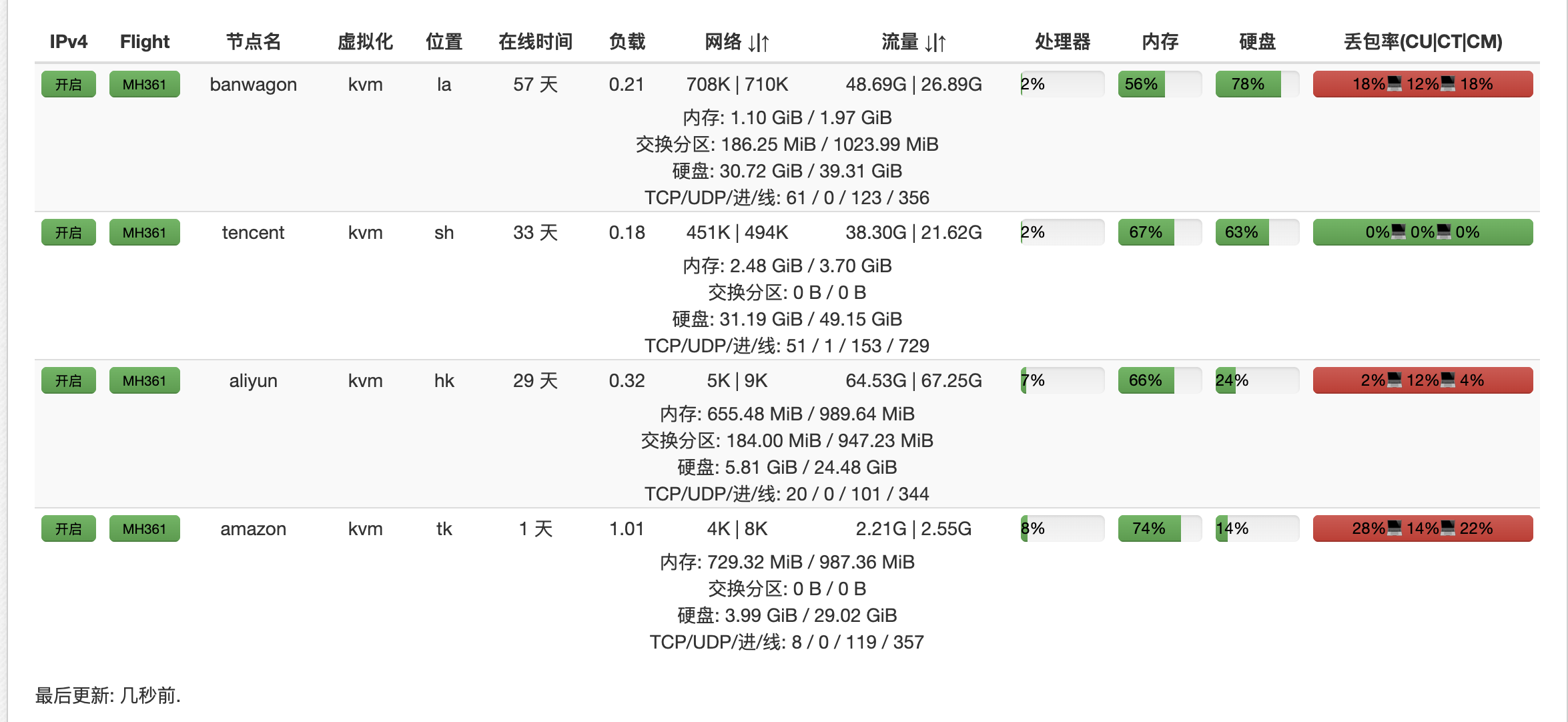
                        <![CDATA[<h2 id="概述">概述</h2><p>使用国内vps中转的场景：</p><blockquote><p>本地直接连国外vps速度不理想，需要使用中转进行加速</p></blockquote><p>为了能够科学上网，已经拥有了四台vps。其实这些在公司网络下访问都还是不错的，可以达到几十M。可惜住处的电信网络，访问国外的节点延时高，白天有时还好，但是到晚上丢包有时特别严重基本没法用。</p><table><thead><tr><th>服务商</th><th>地点</th><th>配置</th><th>价格</th></tr></thead><tbody><tr><td>搬瓦工</td><td>洛杉机</td><td>2C2G</td><td>29.88刀/年</td></tr><tr><td>腾讯云</td><td>上海</td><td>2C4G3M</td><td>699元/3年</td></tr><tr><td>阿里云</td><td>香港</td><td>1C1G</td><td>24元/月</td></tr><tr><td>亚马逊</td><td>东京</td><td>1C1G</td><td>1年免费</td></tr></tbody></table><p><img src="https://freshines.com/upload/2020/3/vps-status-7f3c29562623495e8a4654b2f001fe66.png" alt="" /></p><p>几个海外节点直连的网络都不太好，特别还分成移动、联通、电信，总有一两款运营商的访问不畅，其实不太适合搭建站点。</p><h2 id="国内转发">国内转发</h2><p>腾讯云vps购买的是新人促销活动，性价比还行，但是无法科学上网。且对于没有备案的域名，无法使用80及443端口，只可以使用其它端口。但毕竟是在国内，ping值平均在10+ms，访问网络比较稳定无丢包，因此比较适合用来转发访问vps的请求。如果没有国内的vps，则可以尝试下cloudflare的cdn免费转发，但经测试，对于我的网络并没有太大改观。</p><h2 id="配置方法">配置方法</h2><p>在海外vps上搭建v2ray，域名为 xxx.abc.com:443，直接访问则掉包严重。于是在腾讯云上搭建nginx，域名为 q-xxx.adc.com:8443，在server配置里将请求转发至对应的域名上。这样只需要在v2ray客户端上配置 q-xxx.adc.com:8443即可。</p><pre><code>location / {    proxy_pass https://xxx.abc.com:443;    proxy_connect_timeout 2000;    proxy_read_timeout    3000;    proxy_http_version    1.1;    proxy_set_header      Upgrade     $http_upgrade;    proxy_set_header      Connection  &quot;upgrade&quot;;}</code></pre><h2 id="后记">后记</h2><p>对于每台海外vps都搭建v2ray，对应不同的域名；在腾讯云配置不同的域名转发至不同的海外v2ray，这样就可能很方便的在不同的vps间进行切换。<br />通过腾讯云vps进行转发其实也不是万能的，腾讯云vps到香港阿里云、东京亚马逊的网络掉包也严重，应该国际出口网络的问题。腾讯云到搬瓦工的转发还行，观看youtube1080P视频基本没问题。</p>]]>
                </content>
            </entry>
            <entry>
                <title><![CDATA[车牌摇中]]></title>
                <link rel="alternate" type="text/html" href="https://freshines.com/archives/che-pai-yao-zhong" />
                <id>tag:https://freshines.com,2020-03-03:che-pai-yao-zhong</id>
                <published>2020-03-03T04:58:55+08:00</published>
                <updated>2022-05-04T18:54:58+08:00</updated>
                <author>
                    <name>freshines</name>
                    <uri>https://freshines.com</uri>
                </author>
                <content type="html">
                        <![CDATA[<p>下午还在敲代码中，突然手机来了条短信，扫了一眼是『<em>杭州小客车调控办</em>』。<br />上周的月度摇号没中，今天也没有摇号，以为这短信是啥它的推广短信，定睛一看是说摇中，原来今天有阶梯摇号。<br /><img src="https://freshines.com/upload/2020/3/WechatIMG1875-bbbe155654114a0c9bc02ad06985a87e.jpeg" alt="" /><br />有点不敢置信，在公众号里查了下真的中了，再登录了官网查了下真的中了，这才相信，终于在经历 <em><strong>41</strong></em> 次后中奖。<br /><img src="https://freshines.com/upload/2020/3/WX20200302-205416@2x-f06f3d3771014c2c8b7cdbe26d436bf6.png" alt="WX202003022054162x.png" /></p>]]>
                </content>
            </entry>
            <entry>
                <title><![CDATA[docker login失败解决]]></title>
                <link rel="alternate" type="text/html" href="https://freshines.com/archives/docker-login-fail" />
                <id>tag:https://freshines.com,2020-02-19:docker-login-fail</id>
                <published>2020-02-19T07:35:48+08:00</published>
                <updated>2020-02-19T07:42:24+08:00</updated>
                <author>
                    <name>freshines</name>
                    <uri>https://freshines.com</uri>
                </author>
                <content type="html">
                        <![CDATA[<h2 id="问题描述">问题描述</h2><p>在ubuntu下进行 docker login时报错：</p><pre><code>Error saving credentials: error storing credentials - err: exit status 1, out: `Cannot autolaunch D-Bus without X11 $DISPLAY`</code></pre><h2 id="解决方案">解决方案</h2><h3 id="方法1">方法1</h3><pre><code>docker-compose version</code></pre><p>目前查询到的原因是由于<code>docker-compose</code>引起，所以可以将<code>docker-compose</code>卸载即可</p><pre><code>sudo apt-get autoremove --purge docker-compose #清理docker-compose</code></pre><h3 id="方法2">方法2</h3><p>无须卸载<code>docker-compose</code><br /><a href="https://github.com/docker/compose/issues/6023#issuecomment-419792269">链接</a></p><blockquote><p>Since this is a bug in the Ubuntu packaging for server it needs to be fixed there but in the meantime a work-around without having to uninstall docker-compose temporarily or having to switch to the docker repos instead you can make it use pass instead. This is what I did:</p><pre><code>sudo apt install gnupg2 pass gpg2 --full-generate-key</code></pre><p>This generates a you a gpg2 key, After that's done you can list it with</p><pre><code>gpg2 -k</code></pre><p>Copy the key id (from the line labelled [uid]) and do</p><pre><code>pass init &quot;whatever key id you have&quot;</code></pre><p>After that docker login worked fine since it defaults to use pass and only tries to fallback to secretservice if it can't find it. secretservice seems to have an X11 dependency which isn't present on a basic server install.</p><p>Side effect is that you get a somewhat more secure credentials store or on your server instead of a base64 encoded json file.</p></blockquote><p>在上面生成key的过程中,一路回车</p><pre><code class="language-bash">Please select what kind of key you want:   (1) RSA and RSA (default)   (2) DSA and Elgamal   (3) DSA (sign only)   (4) RSA (sign only)Your selection? RSA keys may be between 1024 and 4096 bits long.What keysize do you want? (3072) Requested keysize is 3072 bitsPlease specify how long the key should be valid.         0 = key does not expire      &lt;n&gt;  = key expires in n days      &lt;n&gt;w = key expires in n weeks      &lt;n&gt;m = key expires in n months      &lt;n&gt;y = key expires in n yearsKey is valid for? (0) Key does not expire at allIs this correct? (y/N) yGnuPG needs to construct a user ID to identify your key.Real name: freshinesEmail address: Comment: You selected this USER-ID:    &quot;freshines&quot;</code></pre>]]>
                </content>
            </entry>
            <entry>
                <title><![CDATA[git同项目关联多仓库]]></title>
                <link rel="alternate" type="text/html" href="https://freshines.com/archives/git-mutil-repository" />
                <id>tag:https://freshines.com,2020-01-21:git-mutil-repository</id>
                <published>2020-01-21T08:59:52+08:00</published>
                <updated>2020-02-05T05:19:56+08:00</updated>
                <author>
                    <name>freshines</name>
                    <uri>https://freshines.com</uri>
                </author>
                <content type="html">
                        <![CDATA[<img src="/upload/2020/1/git-mutil-2c6303f13e884ae98e4b045ffec47c80.gif" width="600"><h1 id="场景">场景</h1><p>平时在使用git时会遇到同一个项目需要推送多个远程仓库的情况。比如：</p><ol><li>公司项目对外接口调用样例代码，是存放在公司的git仓库，但需要推送至<code>github</code>给外面客户使用。</li><li>使用<code>github</code>开源项目时，有时需要对代码进行自定义修改（暂且称为『自有项目』），同时需要能定期合并开源项目的最新特性至『自有项目』。</li></ol><p>以上这两种就属于同个<code>git</code>项目需要多个远程仓库的典型，解决的方法有多种。</p><h1 id="方案1">方案1</h1><h4 id="11-前提">1.1 前提</h4><ul><li>假设样例代码项目<code>self-xxx</code>，同时本地git环境也按正常流程从自有仓库<code>aaa.com:bbb</code>拉取了<code>self-xxx</code>。</li><li><code>github</code>上已建好新项目<code>self-xxx</code>，地址为<code>git@github.com:xxx/self-xxx.git</code></li></ul><h4 id="12-步骤">1.2 步骤</h4><pre><code class="language-bash">$:git remote -v origin  git@aaa.com:bbb/self-xxx.git (fetch)origin  git@aaa.com:bbb/self-xxx.git (push)</code></pre><ul><li>说明<code>orgin</code>对应的远程会仓库地址是bbb，然后添加<code>org</code>(随便定)对应到github仓库</li></ul><pre><code class="language-bash">git remote add org git@github.com:xxx/self-xxx.git</code></pre><ul><li>查看远程分支信息</li></ul><pre><code class="language-bash">$:git remote -v org  git@github.com:xxx/self-xxx.git (fetch)org  git@github.com:xxx/self-xxx.git (push)origin  git@aaa.com:bbb/self-xxx.git (fetch)origin  git@aaa.com:bbb/self-xxx.git (push)</code></pre><ul><li>针对不同分支进行拉取</li></ul><pre><code class="language-bash">git pull origin mastergit pull org master</code></pre><ul><li>每次修改完origin的代码提交后，将<code>origin master</code>合并到<code>org master</code>即可，理论上是不会有冲突的，因为<code>org master</code>是不应该有代码修改操作。</li></ul><pre><code class="language-bash">git merge origin/mastergit push org master</code></pre><h1 id="方案2">方案2</h1><h4 id="21-前提">2.1 前提</h4><p>以<code>alibaba sentinel</code>项目为例，假设自有仓库已经建好项目<code>self-sentinel</code>，同时本地git环境也按正常流程拉取了<code>self-sentinel</code>。</p><h4 id="22-步骤">2.2 步骤</h4><pre><code class="language-bash">$:git remote -v origin  git@github.com:freshines/self-sentinel.git (fetch)origin  git@github.com:freshines/self-sentinel.git (push)</code></pre><ul><li>说明<code>orgin</code>对应的远程会仓库地址是<code>freshines</code>，然后添加<code>alibaba</code>对应到<code>sentinel</code>官方仓库</li></ul><pre><code class="language-bash">git remote add alibaba git@github.com:alibaba/Sentinel.git</code></pre><ul><li>查看远程分支信息</li></ul><pre><code class="language-bash">$:git remote -v alibaba  git@github.com:alibaba/Sentinel.git (fetch)alibaba  git@github.com:alibaba/Sentinel.git (push)origin  git@github.com:freshines/self-sentinel.git (fetch)origin  git@github.com:freshines/self-sentinel.git (push)</code></pre><ul><li>针对不同分支进行拉取/推送</li></ul><pre><code class="language-bash">git pull origin mastergit pull alibaba mastergit push origin mastergit push alibaba master</code></pre><h4 id="23-官方新特性合并">2.3 官方新特性合并</h4><p>拉取官方仓库最新代码至本地，此时本地即有官方分支、也有『自有项目』分支，针对不同情况可以使用<code>merge/rebase/cherry pick</code>等方式进行新特性的合并。</p><h4 id="24-官方代码保留至自有仓库">2.4 官方代码保留至自有仓库</h4><p>上述操作在自有仓库只有『自有项目』的远程分支，没有官方的分支。因此如果另外一人拉取『自有项目』，只能看到『自有项目』代码。所以有时也需要将官方的代码 也存至『自有项目』，方便对比查看。此时可在自有项目』里新建一个分支，每次将<code>alibab/amaster</code>的代码合并或者<code>rebase</code>至该分支即可。</p>]]>
                </content>
            </entry>
            <entry>
                <title><![CDATA[Hello Halo]]></title>
                <link rel="alternate" type="text/html" href="https://freshines.com/archives/hello-halo" />
                <id>tag:https://freshines.com,2020-01-16:hello-halo</id>
                <published>2020-01-16T08:36:29+08:00</published>
                <updated>2020-02-04T01:51:44+08:00</updated>
                <author>
                    <name>freshines</name>
                    <uri>https://freshines.com</uri>
                </author>
                <content type="html">
                        <![CDATA[<p><img src="/upload/2020/2/wordpress-3b2633e774de49a1a7f6b7206d759b39.jpg" alt="wordpress.jpg" /></p><h2 id="hello-halo">Hello Halo!</h2><p>从今天开始告别<em>wordpress</em>，转投<a href="https://github.com/halo-dev/halo">Halo</a>。<br />Halo使用的Java开发，比较熟悉，同时支持Markdown，这点大赞。</p>]]>
                </content>
            </entry>
            <entry>
                <title><![CDATA[开启https-免费的Let’s Encrypt]]></title>
                <link rel="alternate" type="text/html" href="https://freshines.com/archives/free-https-ssl-lets-encrypt" />
                <id>tag:https://freshines.com,2018-01-08:free-https-ssl-lets-encrypt</id>
                <published>2018-01-08T23:01:44+08:00</published>
                <updated>2020-02-05T05:18:31+08:00</updated>
                <author>
                    <name>freshines</name>
                    <uri>https://freshines.com</uri>
                </author>
                <content type="html">
                        <![CDATA[<h2 id="概述">概述</h2><blockquote><p>Let’s Encrypt作为一个公共且免费SSL的项目逐渐被广大用户传播和使用，是由Mozilla、Cisco、Akamai、IdenTrust、EFF等组织人员发起，主要的目的也是为了推进网站从HTTP向HTTPS过度的进程，目前已经有越来越多的商家加入和赞助支持。</p></blockquote><p>感觉全民https时代到了，这段时间看到很多站都开启了https, 刚好昨天看到一条新闻介绍各种免费 SSL 证书，就跟风拿博客练下手吧。<br />对比了多个免费证书厂商的的简介后，决定使用目前使用范围最为广泛的免费 SSL 证书-Let’s Encrypt。虽然它是免费的，但它还有些缺憾的：免费期只有3个月且暂时还不支持提供通配符 SSL 证书，不过目前官方称已经测试通配符证书了，再过一个多月估计就开放了。</p><h2 id="使用步骤">使用步骤</h2><ol><li>获取证书<br />服务器环境：<em>Nginx + Ubuntu</em><br />安装<em>certbot-auto</em>, 有两种方法：<br />a. git克隆：<br /><code>git clone https://github.com/letsencrypt/letsencrypt</code><br />b. 命令行下载：<br /><code>wget https://dl.eff.org/certbot-auto</code></li></ol><p>完成后运行</p><pre><code class="language-bash">./certbot-auto certonly</code></pre><p>第一次运行可能还会自动安装一些依赖，等待自行安装完后将出现:</p><pre><code class="language-bash">How would you like to authenticate with the ACME CA?-------------------------------------------------------------------------------1: Nginx Web Server plugin - Alpha (nginx)2: Spin up a temporary webserver (standalone)3: Place files in webroot directory (webroot)-------------------------------------------------------------------------------Select the appropriate number [1-3] then [enter] (press 'c' to cancel): 1     &lt;---选择验证方式，也就是验证有没有域名所有权Plugins selected: Authenticator nginx, Installer NoneEnter email address (used for urgent renewal and security notices) (Enter 'c' tocancel): xxxxxx@gmail.com        &lt;---接收通知的邮箱，比如证书快到期提醒等-------------------------------------------------------------------------------Please read the Terms of Service athttps://letsencrypt.org/documents/LE-SA-v1.2-November-15-2017.pdf. You mustagree in order to register with the ACME server athttps://acme-v01.api.letsencrypt.org/directory-------------------------------------------------------------------------------(A)gree/(C)ancel: A &lt;---接受服务协议-------------------------------------------------------------------------------Would you be willing to share your email address with the Electronic FrontierFoundation, a founding partner of the Let's Encrypt project and the non-profitorganization that develops Certbot? We'd like to send you email about EFF andour work to encrypt the web, protect its users and defend digital rights.-------------------------------------------------------------------------------(Y)es/(N)o: N    &lt;---这里选N吧，邮箱不接收一些乱七八糟的信息Please enter in your domain name(s) (comma and/or space separated)  (Enter 'c'to cancel): freshines.com www.freshines.com   &lt;---证书对应的域名，多个域名写一起，因为还不支持域名通配，所以二级域名也需要列出来Obtaining a new certificatePerforming the following challenges:tls-sni-01 challenge for freshines.comtls-sni-01 challenge for www.freshines.comWaiting for verification...Cleaning up challengesIMPORTANT NOTES: - Congratulations! Your certificate and chain have been saved at:   /etc/letsencrypt/live/freshines.com/fullchain.pem       Your key file has been saved at:   /etc/letsencrypt/live/freshines.com/privkey.pem   Your cert will expire on 2018-04-08. To obtain a new or tweaked   version of this certificate in the future, simply run   letsencrypt-auto again. To non-interactively renew *all* of your   certificates, run &quot;letsencrypt-auto renew&quot; - Your account credentials have been saved in your Certbot   configuration directory at /etc/letsencrypt. You should make a   secure backup of this folder now. This configuration directory will   also contain certificates and private keys obtained by Certbot so   making regular backups of this folder is ideal. - If you like Certbot, please consider supporting our work by:   Donating to ISRG / Let's Encrypt:   https://letsencrypt.org/donate   Donating to EFF:                    https://eff.org/donate-le</code></pre><p>上面斜体的两处就是证书文件，后面配置将用到这两个路径。</p><ol start="2"><li>nginx配置<br />编辑nginx配置文件</li></ol><pre><code class="language-bash">vi /etc/nginx/nginx.conf</code></pre><pre><code class="language-nginx">server {        # 监听端口        listen       443;        # 域名        server_name www.freshines.com freshines.com;        ssl on;        ssl_certificate /etc/letsencrypt/live/freshines.com/fullchain.pem;        ssl_certificate_key /etc/letsencrypt/live/freshines.com/privkey.pem;...</code></pre><p>如果需要将http强制跳转到https, 在上述文件再添加:</p><pre><code class="language-nginx">server {        # 监听端口        listen       80;        # 域名        server_name www.freshines.com freshines.com;        #rewrite ^(.*)$ https://$host$1 last;        return 301 https://$server_name$request_uri;}</code></pre><h2 id="ssl证书续期">ssl证书续期</h2><p>因为每次只有三个月的免费期，因此到期前需要续期，以免影响访问。我们可以写个定时任务，让系统自动运行进行续期。<br />运行命令：</p><pre><code class="language-bash">crontab -e</code></pre><p>末尾添加以下内容，在每月1日自动运行</p><pre><code class="language-bash">0 0 1 * * /home/freshines/work/online/letsencrypt/certbot-auto renew --pre-hook &quot;service nginx stop&quot; --post-hook &quot;service nginx start&quot;</code></pre>]]>
                </content>
            </entry>
            <entry>
                <title><![CDATA[一次线上tomcat无响应问题排查]]></title>
                <link rel="alternate" type="text/html" href="https://freshines.com/archives/tomcat-no-response" />
                <id>tag:https://freshines.com,2017-01-09:tomcat-no-response</id>
                <published>2017-01-09T22:50:23+08:00</published>
                <updated>2020-02-05T05:21:35+08:00</updated>
                <author>
                    <name>freshines</name>
                    <uri>https://freshines.com</uri>
                </author>
                <content type="html">
                        <![CDATA[<h2 id="问题描述">问题描述</h2><p>前段时间线上遇到个问题，nginx检测检查发现某个结点上tomcat部署的应用不可用就停止转发请求了，不过还有集群其它机器支撑，没对业务造成什么影响。<br />记得以前相同的问题也出现过一次，因为当时较忙临时重启就正常了，也没认真去查明原因。既然再次又出现了，那还是查查原因吧。</p><h2 id="问题排查">问题排查</h2><p>查看进程，tomcat的进程是存活的。<br />查看应用日志，那些调用外部系统日志都正常，这就说明不是内存爆了或都cpu耗尽等外部原因。<br />进一步排查nginx检测的url:</p><pre><code class="language-bash">curl http://xxx/status</code></pre><p>没有发现任何异常信息，但tomcat对于客户端请求没有响应，一脸懵B了~<br />继续curl其它地址，也是相同的现象，初步判断是应用不处理请求了，百思不得其解~<br />继续查，这次是查看堆栈了，总算发现问题有异常现象了</p><pre><code class="language-bash">jstack pid</code></pre><p>满屏都是BLOCKED状态的线程，共1024个，刚好是tomcat配置的最大连接线程数，看来都阻塞在这里，把tomcat线程给耗尽了</p><pre><code>&quot;http-bio-8185-exec-1024&quot; daemon prio=10 tid=0x00007f55bcd6d000 nid=0x66e1 waiting for monitor entry [0x00007f54faaab000]   java.lang.Thread.State: BLOCKED (on object monitor)    at com.xxx.yyy.zzz.ProductKeywordChecker.check(ProductKeywordChecker.java:82)    - waiting to lock  (a java.lang.Object)    at com.xxx.yyy.zzz.ProductKeywordChecker.check(ProductKeywordChecker.java:171)</code></pre><p>定位到ProductKeywordChecker这个类，发现里面有段同步代码，</p><pre><code class="language-java">synchronized(lock){// 这里加锁是不想被多次初始化        targetKeywordChecker = targetCheckers.get(targetId);           if(targetKeywordChecker == null){ // 如果不存在那么会不停的尝试初始化，直到存在为止            getData(xxx);  //请求外部服务进行初始化...        }}</code></pre><p>继续跟踪getData方法，里面有用到 InetAddress.getLocalHost()来获取本机地址信息，同时在堆栈信息看到如下信息：</p><pre><code>&quot;handler.scheduler&quot; daemon prio=10 tid=0x000000004514b000 nid=0x7c2 runnable [0x00007f55b5e88000]    java.lang.Thread.State: RUNNABLEat java.net.Inet6AddressImpl.lookupAllHostAddr(Native Method)    at java.net.InetAddress$1.lookupAllHostAddr(InetAddress.java:876)    at java.net.InetAddress.getAddressFromNameService(InetAddress.java:1229)    at java.net.InetAddress.getLocalHost(InetAddress.java:1399)    - locked  (a java.lang.Object)at xxx.yyy.zzz.config.DataUpdater.getHostInfo(DataUpdater.java:184)</code></pre><p>这里这个线程只是两分钟一次的定时任务，连续查看了几次堆栈，这个线程一直都是locked，。由于仔细想想lookupAllHostAddr()也就获取下本地ip信息，理论应该不需要耗多少时间，怎么可能一直停在这里，应该是有问题的。<br />以前没遇到过这种问题，也只能报着猜测的心态去google，果然找到了答案。</p><h2 id="具体原因">具体原因</h2><p><a href="https://wiki.zimbra.com/wiki/Configuring_for_IPv4">https://wiki.zimbra.com/wiki/Configuring_for_IPv4</a></p><blockquote><p>There are some known problems with applications trying to use IPv6, when the environment is really only configured for IPv4.</p><ol><li>IPv6 changes the way that Round-Robin A-records are used, and instead forces an ordered priority weighting of A-records. This can cause high-availability techniques dependent on round-robin A-records to fail or work incorrectly. If using IPv4/IPv6 dual-stack, then the JVM will use getaddrinfo() instead of gethostbyname(). getaddrinfo() will sort the DNS results in an ordered way, due to RFC 3484 [1]. Some OSs provide /etc/gai.conf configuration options in an attempt to configure record handling.</li><li>The JVM can be blocked by an infinite loop problem between the JVM and libc when using the IPv6 getaddrinfo() libraries with IPv4 addresses.</li></ol></blockquote><p>如果操作系统开启了IPv4/IPv6双栈，java会优先使用ipv6, 所以在上面日志里看到 <em>Inet6AddressImpl.lookupAllHostAddr(Native Method)</em> ，而不是，然而这里在一定条件下会触发Java与libc间的一个bug，导致进入死循环或死锁。<br />这就可以解释通今天线上遇到的问题：<br /><em>getData(xxx)</em> 里调用 <em>Inet6AddressImpl.lookupAllHostAddr(Native Method)</em> 进入死循环或死锁，一直没有返回，而getData(xxx)又在同步代码区，导致其它线程都阻塞在门外，慢慢耗尽了tomcat的线程池，就不再对新请求做出响应</p><h2 id="解决文案">解决文案</h2><p>按网上的解决方案，在应用启动参数里加上：</p><pre><code>-Djava.net.preferIPv4Stack=true</code></pre><p>因为这个线上问题出现的比较偶然，也只在同一台机器上出现过，也没法复现，只能先这样处理。不过现在过去一个多月，没有再出现过。<br /><a href="https://sourceware.org/bugzilla/show_bug.cgi?id=12926#c4">https://sourceware.org/bugzilla/show_bug.cgi?id=12926#c4</a><br />从这里我们可以看到，其实这个问题在2011年的时候都有人报过bug，只是官方一直没有处理，直到2014年才修复，<em>glibc 2.21 (2015-02-06)</em> 才正式发布。</p><p>查看了下服务器的glibc版本，确实还是使用未修复前的版本。</p><pre><code>ldd –versionldd (Debian EGLIBC 2.11.3-4) 2.11.3</code></pre><h2 id="后记总结">后记总结</h2><p>1、在遇到实际问题后，有时找不出原因，就会开始猜疑了，甚至是对一些自己以前的知识理解表示怀疑；<br />2、对于一些公认的工具也要有适当的质疑，比如这次遇到的问题，就是运行环境里的<em>glibc</em>问题。按我们常规的思维，总觉得的都是经过长期实践检验，如果有什么坑，其它人早就遇到，早就有人修复了。可是却忽略了应该具体问题具体分析。就像这次线上的环境一样，高版本的<em>glibc</em>中这个问题早已修复，只是因为我们用的低版本，这个问题仍然存在。</p>]]>
                </content>
            </entry>
            <entry>
                <title><![CDATA[小站被黑hacked]]></title>
                <link rel="alternate" type="text/html" href="https://freshines.com/archives/be-hacked" />
                <id>tag:https://freshines.com,2017-01-09:be-hacked</id>
                <published>2017-01-09T22:47:58+08:00</published>
                <updated>2017-01-09T22:47:58+08:00</updated>
                <author>
                    <name>freshines</name>
                    <uri>https://freshines.com</uri>
                </author>
                <content type="html">
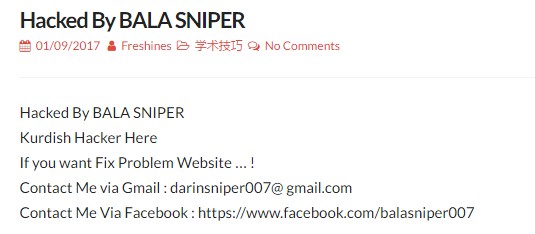
                        <![CDATA[<p><img src="/upload/2020/2/hacker-7872233f1b2a46cc9ded25aa2b29e8e6.jpg" alt="" /><br />没想到像我这种个人玩玩的wordpress博客也会被黑客光顾，实在想不出有啥理由。<br />其实黑了也无所谓，最多也就麻烦点恢复下数据，同时也提醒了我时常要注意备份下数据库。<br />Not funny！</p>]]>
                </content>
            </entry>
            <entry>
                <title><![CDATA[only_full_group_by]]></title>
                <link rel="alternate" type="text/html" href="https://freshines.com/archives/incompatible-with-sql-mode-only-full-group-by" />
                <id>tag:https://freshines.com,2016-07-31:incompatible-with-sql-mode-only-full-group-by</id>
                <published>2016-07-31T22:43:24+08:00</published>
                <updated>2020-02-05T05:36:28+08:00</updated>
                <author>
                    <name>freshines</name>
                    <uri>https://freshines.com</uri>
                </author>
                <content type="html">
                        <![CDATA[<h2 id="问题">问题</h2><p><strong>Mysql</strong> 升级至5.7后发现在原来的有个 <em>group by</em> 语句报错了<code>incompatible with sql_mode=only_full_group_by</code>，一直以来都用的好好的，怎么就突然报错。原来是5.7新加了一些的检查更严格了。</p><blockquote><p>select * from a group by etf_date;<br />which is not functionally dependent on columns in GROUP BY clause; this is incompatible with sql_mode=only_full_group_by</p></blockquote><h2 id="解决方案">解决方案</h2><p>A. 当前实例有效，重启失效</p><pre><code class="language-sql">    SET sql_mode = ''; // 只针对当前客户端有效    SET GLOBAL sql_mode = ''; // 全局有效</code></pre><p>B. 永久生效</p><pre><code class="language-sql">    mysql -u homestead -psecret -e &quot;select @@sql_mode&quot;;    +-------------------------------------------------------------------------------------------------------------------------------------------+    | @@sql_mode                                                                                                                                |    +-------------------------------------------------------------------------------------------------------------------------------------------+    | ONLY_FULL_GROUP_BY,STRICT_TRANS_TABLES,NO_ZERO_IN_DATE,NO_ZERO_DATE,ERROR_FOR_DIVISION_BY_ZERO,NO_AUTO_CREATE_USER,NO_ENGINE_SUBSTITUTION |    +-------------------------------------------------------------------------------------------------------------------------------------------+</code></pre><p>这个就是当前mysql生效的mode, 我们可以去掉我们不需要的一些mode,比如<code>ONLY_FULL_GROUP_BY, NO_ZERO_IN_DATE, NO_ZERO_DATE</code>等这些，然后编辑mysql的配置的文件（比如 <em>/etc/mysql/my.cnf</em>），在  <em>[mysqld]</em> 下加上:</p><pre><code class="language-ini">[mysqld]   sql_mode = &quot;STRICT_TRANS_TABLES,ERROR_FOR_DIVISION_BY_ZERO,NO_AUTO_CREATE_USER,NO_ENGINE_SUBSTITUTION&quot;</code></pre><p>然后保存，退出，最后重启Mysql</p><pre><code>sudo service mysql restart</code></pre><p>大功告成，这些sql的mode将会永久生效了。</p>]]>
                </content>
            </entry>
            <entry>
                <title><![CDATA[HDOJ5690 All X]]></title>
                <link rel="alternate" type="text/html" href="https://freshines.com/archives/hdojall-x" />
                <id>tag:https://freshines.com,2016-05-21:hdojall-x</id>
                <published>2016-05-21T22:38:52+08:00</published>
                <updated>2020-02-05T05:10:48+08:00</updated>
                <author>
                    <name>freshines</name>
                    <uri>https://freshines.com</uri>
                </author>
                <content type="html">
                        <![CDATA[<p>晚上看到百度之星第二轮比赛的题目，好久没水题了，心血来潮水做一题吧。<br />太久没用C了，写起来感觉好陌生。<br />题目：<a href="http://acm.hdu.edu.cn/showproblem.php?pid=5690">All X</a></p><p>思路嘛就是取模找周期，才取模10000，最多循环10000次总会重复的，<br />但是要注意进入取模周期前可能会有段干扰数，这里是需要特殊处理的。</p><pre><code class="language-cpp">#include&lt;stdio.h&gt;#include&lt;string.h&gt;int main(){    int cnt, N;    int x ,m, k, c;    int t[10001];    scanf(&quot;%d&quot;, &amp;N);    for(int i=0; i&lt;N; i++){        printf(&quot;Case #%d:\n&quot;, i+1);        scanf(&quot;%d%d%d%d&quot;, &amp;x, &amp;m, &amp;k, &amp;c);        memset(t, -1, sizeof(t));        int left = x % k;        cnt = 0;        while(t[left] == -1 &amp;&amp; cnt &lt; m){            t[left] = ++cnt;            left = (left*10+x) % k;        }        if(t[c] == -1){            puts(&quot;No&quot;);            continue;        }        if(cnt == m){            if(t[c] == cnt){                puts(&quot;Yes&quot;);            }else{                puts(&quot;No&quot;);            }            continue;        }        if(t[c]&gt;=t[left] &amp;&amp;(m-t[c])%(cnt-t[left]+1) == 0){                puts(&quot;Yes&quot;);            }else{                puts(&quot;No&quot;);            }    }    return 0;}</code></pre>]]>
                </content>
            </entry>
            <entry>
                <title><![CDATA[猝不及防的伤害]]></title>
                <link rel="alternate" type="text/html" href="https://freshines.com/archives/cu-bu-ji-fang-de-shang-hai" />
                <id>tag:https://freshines.com,2016-03-30:cu-bu-ji-fang-de-shang-hai</id>
                <published>2016-03-30T22:37:39+08:00</published>
                <updated>2016-03-30T22:37:39+08:00</updated>
                <author>
                    <name>freshines</name>
                    <uri>https://freshines.com</uri>
                </author>
                <content type="html">
                        <![CDATA[<p>最近发现一直抓取解析的网页出问题了，遂调试之。<br />找到一篇例文，按下F12。。。</p><p><a href="http://view.163.com/special/resound/soebankrupt20160330.html">链接</a><br />░░░░░░░░▌▒█░░░░░░░░░░░▄▀▒▌<br />░░░░░░░░▌▒▒█░░░░░░░░▄▀▒▒▒▐<br />░░░░░░░▐▄▀▒▒▀▀▀▀▄▄▄▀▒▒▒▒▒▐<br />░░░░░▄▄▀▒░▒▒▒▒▒▒▒▒▒█▒▒▄█▒▐<br />░░░▄▀▒▒▒░░░▒▒▒░░░▒▒▒▀██▀▒▌<br />░░▐▒▒▒▄▄▒▒▒▒░░░▒▒▒▒▒▒▒▀▄▒▒<br />░░▌░░▌█▀▒▒▒▒▒▄▀█▄▒▒▒▒▒▒▒█▒▐<br />░▐░░░▒▒▒▒▒▒▒▒▌██▀▒▒░░░▒▒▒▀▄<br />░▌░▒▄██▄▒▒▒▒▒▒▒▒▒░░░░░░▒▒▒▒<br />▀▒▀▐▄█▄█▌▄░▀▒▒░░░░░░░░░░▒▒▒</p>]]>
                </content>
            </entry>
            <entry>
                <title><![CDATA[编程字体推荐–CamingoCode Bold]]></title>
                <link rel="alternate" type="text/html" href="https://freshines.com/archives/bian-cheng-zi-ti-tui-jian-camingocode" />
                <id>tag:https://freshines.com,2016-03-25:bian-cheng-zi-ti-tui-jian-camingocode</id>
                <published>2016-03-25T22:23:33+08:00</published>
                <updated>2020-02-04T22:36:44+08:00</updated>
                <author>
                    <name>freshines</name>
                    <uri>https://freshines.com</uri>
                </author>
                <content type="html">
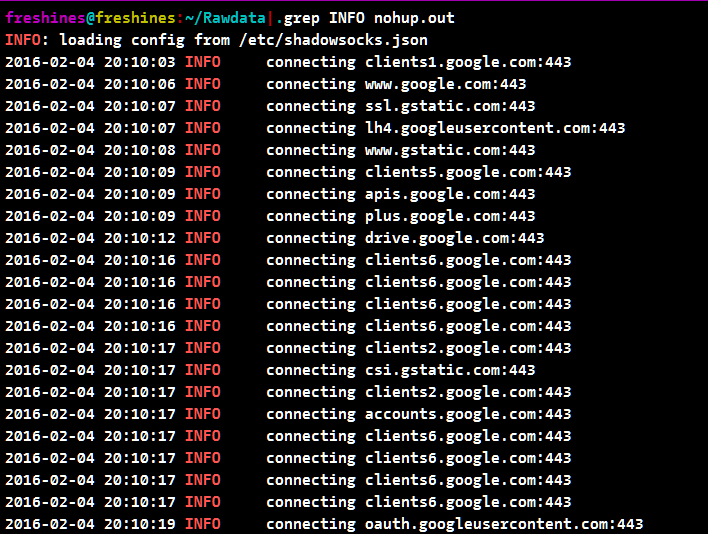
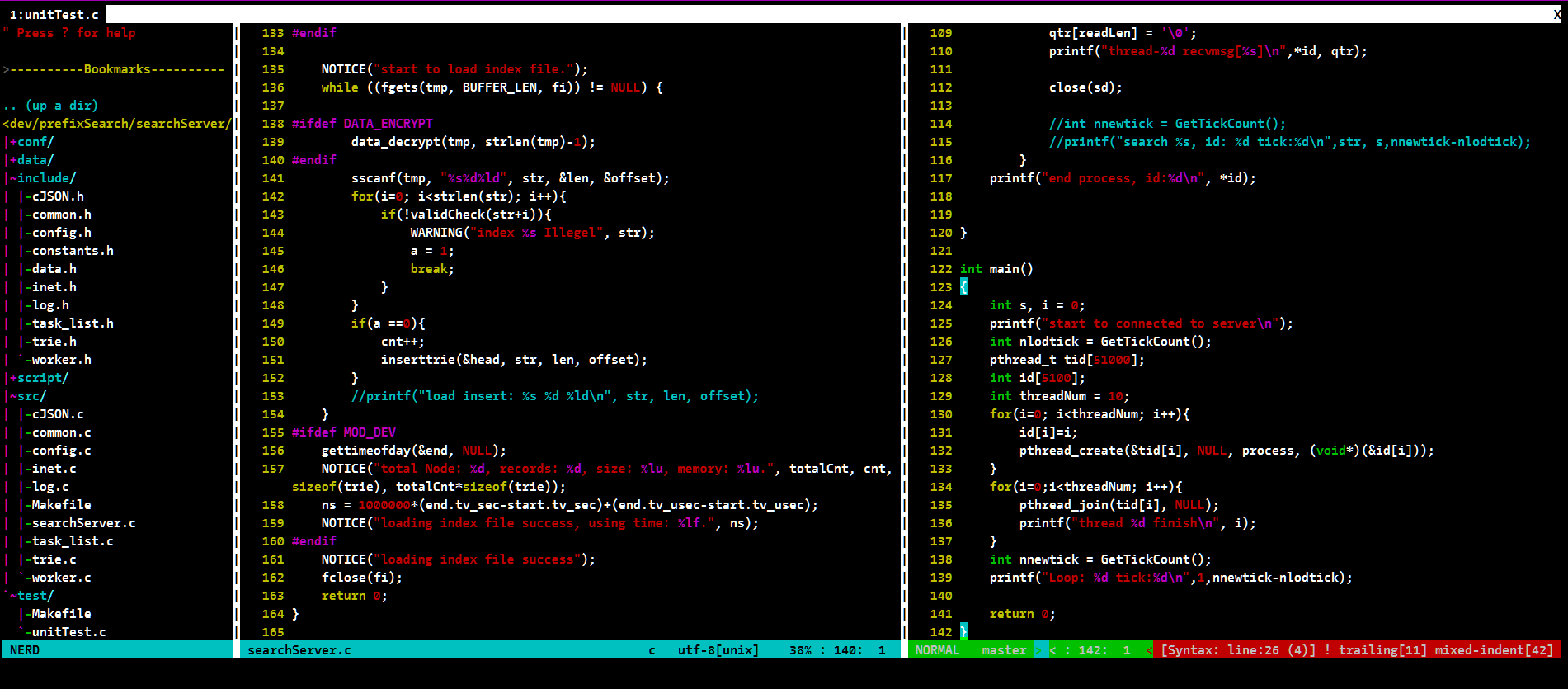
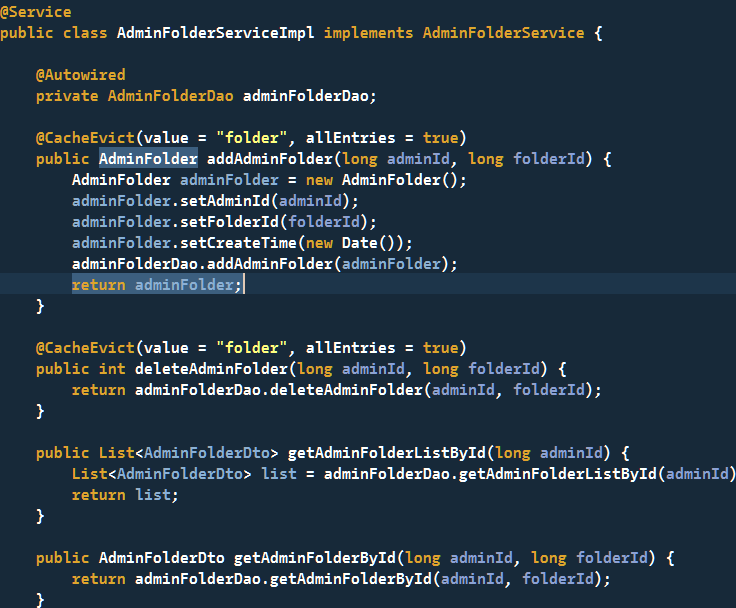
                        <![CDATA[<h2 id="概述">概述</h2><p>每一位程序员都希望有令自己满意的代码编辑器与编程字体，每天自己用着、看着都觉得舒服。<br />至少在被那些乱七八糟的需求搞的心情不好时，还算有点慰藉。于是就前段时间各种度娘、谷老师，尝试了多种网友的推荐字体，但总是很难找到称心如意的代码字体。这些字体要不就是对中文显示支持不好，要不就是需要字体比较大才能达到最佳显示效果，而个人又不喜欢字体太大的。</p><h2 id="下载">下载</h2><p>今天推荐一款字体，感觉还是比较适合显示程序代码的。经各种组合尝试，这种字体的粗体及12px能达到比较令我满意的效果。<br />CamingoCode Bold： <a href="https://en.m.fontke.com/download/?hash=8Zrtz0uza%2BhFpIrS40rFUi5k%2B7HQLPP654ObCnqW4BuZmYXd2ySPZNnGDVmKDRSBrembnKjx1ueDofLordWuRYNz8J1th9oUc4YXcE5LXys%3D&amp;name=camingocode-bold.woff.ttf">点击下载</a></p><p>PS：win10安装字体死活安装不成功，原来是因为防火墙没打开的。。。这与防火墙有毛线关系啊，这不是逼我打开他家的防火墙么，巨硬公司什么变成这样了。。。</p><p>最后还是上图吧，一切还是颜值说话：</p><h2 id="示例">示例</h2><ol><li><p>linux下查日志：<br /><img src="/upload/2020/2/terminer-font-47a288259de64b959ffe80bf24e72351.png" alt="" /></p></li><li><p>linux下vim：<br /><img src="/upload/2020/2/vim-font-037c10f31d5b48fd85a8aa138778f70f.png" alt="" /></p></li><li><p>Eclipse：<br /><img src="/upload/2020/2/eclipse-font-8c227ea8b131449490313a605158329e.png" alt="" /></p></li><li><p>NodePad++：<br /><img src="/upload/2020/2/nodepad-f8830e98a39c4c6e8ed6b62ad8e5aafd.png" alt="" /></p></li></ol>]]>
                </content>
            </entry>
            <entry>
                <title><![CDATA[ubuntu configuration出错]]></title>
                <link rel="alternate" type="text/html" href="https://freshines.com/archives/ubuntu-configuration-chu-cuo" />
                <id>tag:https://freshines.com,2014-10-11:ubuntu-configuration-chu-cuo</id>
                <published>2014-10-11T22:18:20+08:00</published>
                <updated>2014-10-11T22:18:20+08:00</updated>
                <author>
                    <name>freshines</name>
                    <uri>https://freshines.com</uri>
                </author>
                <content type="html">
                        <![CDATA[<p>ubunut 装的时候遇到了个头疼的问题，导致删也删不掉，重装也报错，更坑的的它出错导致系统更新也完成不了。。。</p><pre><code>Unpacking mysql-server (from .../mysql-server_5.5.34-0ubuntu0.12.04.1_all.deb) ...Processing triggers for man-db ...Setting up libmysqlclient18 (5.5.34-0ubuntu0.12.04.1) ...Setting up libdbd-mysql-perl (4.020-1build2) ...Setting up mysql-client-core-5.5 (5.5.34-0ubuntu0.12.04.1) ...Setting up mysql-client-5.5 (5.5.34-0ubuntu0.12.04.1) ...Setting up mysql-server-core-5.5 (5.5.34-0ubuntu0.12.04.1) ...Setting up mysql-server-5.5 (5.5.34-0ubuntu0.12.04.1) ...131130 18:01:34 [Warning] Using unique option prefix key_buffer instead of key_buffer_size is deprecated and will be removed in a future release. Please use the full name instead.start: Job failed to startinvoke-rc.d: initscript mysql, action &quot;start&quot; failed.dpkg: error processing mysql-server-5.5 (--configure): subprocess installed post-installation script returned error exit status 1dpkg: dependency problems prevent configuration of mysql-server: mysql-server depends on mysql-server-5.5; however:  Package mysql-server-5.5 is not configured yet.dpkg: error processing mysql-server (--configure): dependency problems - leaving unconfiguredProcessing triggers for libc-bin ...No apport report written because the error message indicates its a followup error from a previous failure.                          ldconfig deferred processing now taking placeErrors were encountered while processing: mysql-server-5.5 mysql-serverE: Sub-process /usr/bin/dpkg returned an error code (1)</code></pre><p>最终在stackoverflow上找到了可行的方案：</p><pre><code>sudo apt-get --reinstall install mysql-server-5.5</code></pre>]]>
                </content>
            </entry>
            <entry>
                <title><![CDATA[python解析网页时的空格\xc2\xa0]]></title>
                <link rel="alternate" type="text/html" href="https://freshines.com/archives/python-jie-xi-wang-ye-shi-di-kong-ge-xc2xa0" />
                <id>tag:https://freshines.com,2014-09-10:python-jie-xi-wang-ye-shi-di-kong-ge-xc2xa0</id>
                <published>2014-09-10T22:16:03+08:00</published>
                <updated>2014-09-10T22:16:03+08:00</updated>
                <author>
                    <name>freshines</name>
                    <uri>https://freshines.com</uri>
                </author>
                <content type="html">
                        <![CDATA[<h2 id="问题">问题</h2><p>最近在用python抓取页面做内容解析时，遇到个问题， 需要将页面的一个用空白隔开的内容解析分成前后两部分，用 event.split(‘ ‘)这个方法，始终得不到想要的结果。从网页内容表面上看，是被空白分隔开来，但查看页面源码就可以看到，其实源码中的空白不一定是空格，有可能是&amp; nbsp。如果是&amp; nbsp时，当python以utf-8抓取下来后，空格已经变为\xc2\xa0，此时用split(‘ ‘)将有问题，甚至有些会报关于\xc2的错误。</p><h2 id="解决文案">解决文案</h2><p>正确方法是用event.split(‘\xc2\xa0’)，可以按空白分离出两个部分。<br />如果是想删除这个空白，也可以用replace(‘\xc2\xa0’, ‘ ‘)。</p>]]>
                </content>
            </entry>
            <entry>
                <title><![CDATA[chrome dev声音卡]]></title>
                <link rel="alternate" type="text/html" href="https://freshines.com/archives/chrome-dev-sound-card" />
                <id>tag:https://freshines.com,2012-07-10:chrome-dev-sound-card</id>
                <published>2012-07-10T22:12:57+08:00</published>
                <updated>2012-07-10T22:12:57+08:00</updated>
                <author>
                    <name>freshines</name>
                    <uri>https://freshines.com</uri>
                </author>
                <content type="html">
                        <![CDATA[<p>从<em>chrome dev 21</em>开始，在Win7下播放网页上音乐时声音就变成一卡一卡的了，<em>dev 21</em>都更新了几个版本了这个BUG还是没有解决，所以不得不又装回到了<em>dev 20</em>，今天dev又更新到了22，竟然还是老样子。找了半天于有了解决方法：从地址栏进入 <a href="chrome://plugins/">chrome://plugins/</a> ，点击详细, 将这个禁用掉就行了</p><blockquote><p>Name:Shockwave Flash<br />Description:Shockwave Flash 11.3 r31<br />Version:11.3.31.213<br />Location:C:\Users\Freshines\AppData\Local\Google\Chrome\Application\22.0.1201.0\PepperFlash\pepflashplayer.dll<br />Type:PPAPI (out-of-process)<br />Disable<br />MIME types:<br />MIME typeDescriptionFile extensions<br />application/x-shockwave-flashShockwave Flash.swf<br />application/futuresplashFutureSplash Player .spl</p></blockquote>]]>
                </content>
            </entry>
            <entry>
                <title><![CDATA[Internet Connection Sharing 脚本开启]]></title>
                <link rel="alternate" type="text/html" href="https://freshines.com/archives/internet-connection-sharing-script-to-open" />
                <id>tag:https://freshines.com,2012-07-09:internet-connection-sharing-script-to-open</id>
                <published>2012-07-09T22:12:44+08:00</published>
                <updated>2020-02-05T05:25:29+08:00</updated>
                <author>
                    <name>freshines</name>
                    <uri>https://freshines.com</uri>
                </author>
                <content type="html">
                        <![CDATA[<p>打算暑假基本就宅在寝室了，不怎么想去实验室了。<br />顺便去买个6M的闪讯帐号，再连个无线路由，室友也可以用，手机也可以用用。同学给了个破解的程序，可以用的，只是比较麻烦。每次先在主机是用官方客户端连接，会生成一个新的<em>ChinaNetSNWide</em>连接，再手动把连接共享，再用破解程序来保持连接，而<em>Windows</em>上的连接共享会改变IP，所以每次分机都需要把网关改为主机的IP，当然首先在保证<em>ICS(Internet Connection Sharing</em>)服务开启了。。于是就想到了用批处理来自动完成，免了手动去改共享和IP。</p><h2 id="icsvbs">ics.vbs</h2><pre><code class="language-vbscript">@echo offecho 开始设置主机固定IP地址！请稍候……echo 出现防火墙提示请点击允许！netsh interface ip set address &quot;Wireless Network Connection 2&quot; static 192.168.1.100 255.255.255.0 192.168.1.1 1echo 设置DNS服务器！请稍候……echo 出现防火墙提示请点击允许！netsh interface ip set dns &quot;Wireless Network Connection 2&quot; static 8.8.8.8 primarynetsh interface ip add dns &quot;Wireless Network Connection 2&quot; 8.8.4.4echo IP地址：192.168.1.100echo 子网掩码：255.255.255.0echo 默认网关：192.168.1.1echo DNS服务器：echo 8.8.8.8echo 8.8.4.4pausechangeip.bat主要是用于主机的IP更改，定死了IP为192.168.1.100，方便后面分机的网关填写。'用法 cscript  /nologo ics.vbs &quot;内网适配器名称&quot; &quot;外网网络连接名称&quot; &quot;off/on&quot;OPTION EXPLICITDIM ICSSC_DEFAULT, CONNECTION_PUBLIC, CONNECTION_PRIVATE, CONNECTION_ALLDIM NetSharingManagerDIM PublicConnection, PrivateConnectionDIM EveryConnectionCollectionDIM objArgsDIM priv_con, publ_conDIM switchICSSC_DEFAULT       = 0CONNECTION_PUBLIC   = 0CONNECTION_PRIVATE  = 1CONNECTION_ALL      = 2Main()sub Main( )    Set objArgs = WScript.Arguments    if  objArgs.Count = 3 thenpriv_con      = objArgs(0)   '内网适配器名称publ_con      = objArgs(1)   '外网网络连接名称switch        = objArgs(2)   '状态切换开关 on 为打开 off 相反        if Initialize() = TRUE then            GetConnectionObjects()            FirewallTestByDeviceName priv_con,publ_con        end if    else        if Initialize() = TRUE then            GetConnectionObjects()            FirewallTestByDeviceName &quot;list&quot;,&quot;list&quot;        end if    end ifend subsub FirewallTestByDeviceName(con1,con2)on error resume next    DIM Item    DIM EveryConnection    DIM objNCProps    DIM szMsg    DIM bFound1,bFound2    WScript.echo(vbCRLF)    bFound1 = false    bFound2 = false    for each Item in EveryConnectionCollection        set EveryConnection = NetSharingManager.INetSharingConfigurationForINetConnection(Item)        set objNCProps = NetSharingManager.NetConnectionProps(Item)        szMsg = &quot;Name: &quot;       &amp; objNCProps.Name       &amp; vbCRLF &amp; _                &quot;Guid: &quot;       &amp; objNCProps.Guid       &amp; vbCRLF &amp; _                &quot;DeviceName: &quot; &amp; objNCProps.DeviceName &amp; vbCRLF &amp; _                &quot;Status: &quot;     &amp; objNCProps.Status     &amp; vbCRLF &amp; _                &quot;MediaType: &quot;  &amp; objNCProps.MediaType        if EveryConnection.SharingEnabled then            szMsg = szMsg            &amp; vbCRLF &amp; _                    &quot;SharingEnabled&quot; &amp; vbCRLF &amp; _                    &quot;SharingType:  &quot; &amp; ConvertConnectionTypeToString(EveryConnection.SharingConnectionType)        end if        if objNCProps.DeviceName = con1 then            bFound1 = true            if EveryConnection.SharingEnabled = False and switch=&quot;on&quot; then                szMsg = szMsg &amp; vbCRLF &amp; &quot;Not Shared... Enabling private connection share...&quot;                EveryConnection.EnableSharing CONNECTION_PRIVATE            end ifif switch=&quot;off&quot; thenszMsg = szMsg &amp; vbCRLF &amp; &quot;Shared... DisEnabling private connection share...&quot;EveryConnection.EnableSharing CONNECTION_ALLend if        end if        if objNCProps.Name = con2 then            bFound2 = true            if EveryConnection.SharingEnabled = False and switch=&quot;on&quot; then                szMsg = szMsg &amp; vbCRLF &amp; &quot;Not Shared... Enabling public connection share...&quot;                EveryConnection.EnableSharing CONNECTION_PUBLIC            end ifif switch=&quot;off&quot; thenszMsg = szMsg &amp; vbCRLF &amp; &quot;Shared... DisEnabling public connection share...&quot;EveryConnection.EnableSharing CONNECTION_ALLend if        end if        WScript.Echo(szMsg &amp; vbCRLF)    nextif( con1 &lt;&gt; &quot;list&quot; ) thenif( bFound1 = false ) thenWScript.Echo( &quot;Connection &quot; &amp; chr(34) &amp; con1 &amp; chr(34) &amp; &quot; was not found&quot; )end ifif( bFound2 = false ) thenWScript.Echo( &quot;Connection &quot; &amp; chr(34) &amp; con2 &amp; chr(34) &amp; &quot; was not found&quot; )end ifend ifend subfunction Initialize()    DIM bReturn    bReturn = FALSE    set NetSharingManager = Wscript.CreateObject(&quot;HNetCfg.HNetShare.1&quot;)    if (IsObject(NetSharingManager)) = FALSE then        Wscript.Echo(&quot;Unable to get the HNetCfg.HnetShare.1 object&quot;)    else        if (IsNull(NetSharingManager.SharingInstalled) = TRUE) then            Wscript.Echo(&quot;Sharing isn't available on this platform.&quot;)        else            bReturn = TRUE        end if    end if    Initialize = bReturnend functionfunction GetConnectionObjects()    DIM bReturn    DIM Item    bReturn = TRUE    if GetConnection(CONNECTION_PUBLIC) = FALSE then        bReturn = FALSE    end if    if GetConnection(CONNECTION_PRIVATE) = FALSE then        bReturn = FALSE    end if    if GetConnection(CONNECTION_ALL) = FALSE then        bReturn = FALSE    end if    GetConnectionObjects = bReturnend functionfunction GetConnection(CONNECTION_TYPE)    DIM bReturn    DIM Connection    DIM Item    bReturn = TRUE    if (CONNECTION_PUBLIC = CONNECTION_TYPE) then        set Connection = NetSharingManager.EnumPublicConnections(ICSSC_DEFAULT)        if (Connection.Count &gt; 0) and (Connection.Count &lt; 2) then            for each Item in Connection                set PublicConnection = NetSharingManager.INetSharingConfigurationForINetConnection(Item)            next        else            bReturn = FALSE        end if    elseif (CONNECTION_PRIVATE = CONNECTION_TYPE) then        set Connection = NetSharingManager.EnumPrivateConnections(ICSSC_DEFAULT)        if (Connection.Count &gt; 0) and (Connection.Count &lt; 2) then            for each Item in Connection                set PrivateConnection = NetSharingManager.INetSharingConfigurationForINetConnection(Item)            next        else            bReturn = FALSE        end if    elseif (CONNECTION_ALL = CONNECTION_TYPE) then        set Connection = NetSharingManager.EnumEveryConnection        if (Connection.Count &gt; 0) then            set EveryConnectionCollection = Connection        else            bReturn = FALSE        end if    else        bReturn = FALSE    end if    if (TRUE = bReturn)  then        if (Connection.Count = 0) then            Wscript.Echo(&quot;No &quot; + CStr(ConvertConnectionTypeToString(CONNECTION_TYPE)) + &quot; connections exist (Connection.Count gave us 0)&quot;)            bReturn = FALSE        'valid to have more than 1 connection returned from EnumEveryConnection        elseif (Connection.Count &gt; 1) and (CONNECTION_ALL &lt;&gt; CONNECTION_TYPE) then            Wscript.Echo(&quot;ERROR: There was more than one &quot; + ConvertConnectionTypeToString(CONNECTION_TYPE) + &quot; connection (&quot; + CStr(Connection.Count) + &quot;)&quot;)            bReturn = FALSE        end if    end if    Wscript.Echo(CStr(Connection.Count) + &quot; objects for connection type &quot; + ConvertConnectionTypeToString(CONNECTION_TYPE))    GetConnection = bReturnend functionfunction ConvertConnectionTypeToString(ConnectionID)    DIM ConnectionString    if (ConnectionID = CONNECTION_PUBLIC) then        ConnectionString = &quot;public&quot;    elseif (ConnectionID = CONNECTION_PRIVATE) then        ConnectionString = &quot;private&quot;    elseif (ConnectionID = CONNECTION_ALL) then        ConnectionString = &quot;all&quot;    else        ConnectionString = &quot;Unknown: &quot; + CStr(ConnectionID)    end if    ConvertConnectionTypeToString = ConnectionStringend function</code></pre><p>ics.vbs是在网上找的，可以用于ICS的开启，虽不懂VB，但会调用就行了，要注意参数一个是内网适配器名称，另一个是外网网络连接名称。</p><h2 id="changeipbat">Changeip.bat</h2><pre><code class="language-dos">@echo offecho 确定闪讯已连接成功？？？pauseStart &quot;&quot; &quot;闪讯终结者.exe&quot;echo 闪讯终结者运行成功！cscript /nologo ics.vbs &quot;Atheros AR5B97 Wireless Network Adapter&quot; &quot;ChinaNetSNWide&quot; &quot;on&quot;echo ics 开启成功！pause Changeip.batecho  ip切换完成,请手动退出闪讯客户端！！！pause</code></pre><p>Changeip.bat对于主机只要运行这个批处理就行了。</p><h2 id="clientbat">Client.bat</h2><pre><code class="language-dos">@echo offclsecho 开始设置固定IP地址！请稍候……echo 出现防火墙提示请点击允许！netsh interface ip set address &quot;Wireless Network Connection 2&quot; static 192.168.1.110 255.255.255.0 192.168.1.100 1echo 设置DNS服务器！请稍候……echo 出现防火墙提示请点击允许！netsh interface ip set dns &quot;Wireless Network Connection 2&quot; static 8.8.8.8 primarynetsh interface ip add dns &quot;Wireless Network Connection 2&quot; 8.8.4.4clsecho 设置已经完成！echo IP地址：192.168.1.110echo 子网掩码：255.255.255.0echo 默认网关：192.168.1.100echo DNS服务器：echo 8.8.8.8echo 8.8.4.4pause </code></pre><p>Client.bat是给分机用的，主要是把网关改成主机的IP，且自己的IP不要和别的重复就行了。</p>]]>
                </content>
            </entry>
            <entry>
                <title><![CDATA[NameNode is not formatted]]></title>
                <link rel="alternate" type="text/html" href="https://freshines.com/archives/namenode-is-not-formatted" />
                <id>tag:https://freshines.com,2012-02-26:namenode-is-not-formatted</id>
                <published>2012-02-26T21:59:52+08:00</published>
                <updated>2020-02-04T22:05:37+08:00</updated>
                <author>
                    <name>freshines</name>
                    <uri>https://freshines.com</uri>
                </author>
                <content type="html">
                        <![CDATA[<p>在hadoop集群master上jps:</p><pre><code> 26690 Jps25840 JobTracker25480 DataNode25746 SecondaryNameNode26084 TaskTracker26639 FsShell</code></pre><p>上面少了个NameNode，导致虽dataNode上jps都正常，但在web端的DataNode数为零。</p><p>查看logs/hadoop-*-namenode.log:</p><pre><code>2012-02-25 18:49:25,435 INFO org.apache.hadoop.hdfs.server.namenode.FSNamesystem: Registered FSNamesystemStateMBean and NameNodeMXBean2012-02-25 18:49:25,452 INFO org.apache.hadoop.hdfs.server.namenode.NameNode: Caching file names occuring more than 10 times2012-02-25 18:49:25,459 ERROR org.apache.hadoop.hdfs.server.namenode.FSNamesystem: FSNamesystem initialization failed.java.io.IOException: NameNode is not formatted.at org.apache.hadoop.hdfs.server.namenode.FSImage.recoverTransitionRead(FSImage.java:315)at org.apache.hadoop.hdfs.server.namenode.FSDirectory.loadFSImage(FSDirectory.java:97)at org.apache.hadoop.hdfs.server.namenode.FSNamesystem.initialize(FSNamesystem.java:386)at org.apache.hadoop.hdfs.server.namenode.FSNamesystem.(FSNamesystem.java:360)at org.apache.hadoop.hdfs.server.namenode.NameNode.initialize(NameNode.java:276)at org.apache.hadoop.hdfs.server.namenode.NameNode.(NameNode.java:496)at org.apache.hadoop.hdfs.server.namenode.NameNode.createNameNode(NameNode.java:1279)at org.apache.hadoop.hdfs.server.namenode.NameNode.main(NameNode.java:1288)2012-02-25 18:49:25,461 ERROR org.apache.hadoop.hdfs.server.namenode.NameNode: java.io.IOException: NameNode is not formatted.at org.apache.hadoop.hdfs.server.namenode.FSImage.recoverTransitionRead(FSImage.java:315)at org.apache.hadoop.hdfs.server.namenode.FSDirectory.loadFSImage(FSDirectory.java:97)at org.apache.hadoop.hdfs.server.namenode.FSNamesystem.initialize(FSNamesystem.java:386)at org.apache.hadoop.hdfs.server.namenode.FSNamesystem.(FSNamesystem.java:360)at org.apache.hadoop.hdfs.server.namenode.NameNode.initialize(NameNode.java:276)at org.apache.hadoop.hdfs.server.namenode.NameNode.(NameNode.java:496)at org.apache.hadoop.hdfs.server.namenode.NameNode.createNameNode(NameNode.java:1279)at org.apache.hadoop.hdfs.server.namenode.NameNode.main(NameNode.java:1288)</code></pre><p>可以看出是NameNode is not formatted出了问题。<br />到处都说./hadoop nomenode -format, 运行结果却没有用，错误依旧存在。</p><p>在conf/hdfs-site.xml中配置的目录，<br />dfs.data.dir<br />/home/hadoop/dfs/data<br />这个就是format的目录，而./hadoop nomenode -format后，出现下面这种信息才算format成功，<br />而开始不知道，所以还奇怪为什么每次format后还出现上面的错误。</p><pre><code>12/02/25 19:52:40 INFO util.GSet: VM type = 32-bit12/02/25 19:52:40 INFO util.GSet: 2% max memory = 36.37375 MB12/02/25 19:52:40 INFO util.GSet: capacity = 2^23 = 8388608 entries12/02/25 19:52:40 INFO util.GSet: recommended=8388608, actual=838860812/02/25 19:52:40 INFO namenode.FSNamesystem: fsOwner=freshines12/02/25 19:52:40 INFO namenode.FSNamesystem: supergroup=supergroup12/02/25 19:52:40 INFO namenode.FSNamesystem: isPermissionEnabled=false12/02/25 19:52:40 INFO namenode.FSNamesystem: dfs.block.invalidate.limit=100</code></pre><p>对于format不成功的，就将上面hdfs-site.xml中的这个data目录删除再./hadoop nomenode -format即可。<br />网上都只是说./hadoop nomenode -format，却都没说format不成功的情况，一个下午就在摸索这个了。</p>]]>
                </content>
            </entry>
</feed>